Template
Free Supplier Statement Reconciliation Template (Excel Workbook)
This is a free spreadsheet for reconciling one supplier statement to your purchase ledger. No email address needed. Every difference gets a named cause, and the sheet will not sign off while any amount is left unexplained. It opens in Excel and Google Sheets; what we tested and what we did not is further down. The method behind it is in the full supplier statement reconciliation guide.
Pemberton Fastenings sends its September statement at 11,078.45. Your purchase ledger says 7,082.30. The 3,996.15 gap is made of three parts. Of that, 1,053.80 is yours to post straight away, and 111.00 needs a question to the supplier first, after which you post the 45.00 once they confirm. The remaining 2,831.35 is timing that clears next month.
One catch before you download: a spreadsheet does not read the PDF, so you paste or type the lines yourself. That is fine for a handful of suppliers. With dozens, it takes most of the month.
By Michael Usov, FounderPublished Updated 20 min read
Key takeaways
- The template pairs lines by document number, compares totals per document, and refuses sign-off while any difference has no cause code.
- In the worked case the 3,996.15 gap splits into 1,053.80 to post, 111.00 to query and 2,831.35 of timing. Most of the gap needs no correction at all.
- A small net gap can hide a lot of exceptions. Here 6,296.55 of differences, counted without signs, net down to 3,996.15 because a credit note and a duplicate pull the other way.
- It uses only functions that Excel, Google Sheets and LibreOffice share: no macros, no add-ins, no XLOOKUP.
- The real cost of a spreadsheet is typing the statement lines, and that grows with every supplier.
On this page
What is in the template and what does it do?
Short answer
What is a supplier statement reconciliation template?
A supplier statement reconciliation template is a spreadsheet for checking a supplier’s statement against your purchase ledger. The statement lines go on one side and the ledger lines on the other, matched by invoice or credit note number. Whatever is left over explains the difference, and each difference is given a reason and a next step.
The bridge is just the list of differences between the supplier's closing balance and yours. Search for a vendor statement reconciliation template or a creditors reconciliation sheet and you are after the same thing. In this file you only type into three places. Balances and sign-off go on the Reconciliation sheet, and the lines you paste go on the Statement and Ledger sheets. The rest fills itself in from formulas.
The sheet calls a line Matched when the document and the amount both agree. If they do not, the line needs a cause code, and the Checks sheet fails any difference that has none. Spelling is ignored when it compares documents, so PF/31842, PF31842 and 31842 all count as the same one. A credit note numbered 100 will not pair with an invoice numbered 100. Payments pair on amount alone, since the supplier and your ledger rarely put the same reference on a payment.
The other sheets are support. Read me explains matching, signs and limits. Lines lists every exception in one place. Cause codes holds 31 codes, each with an owner, a next move and wording for the supplier. Checks runs 12 pass or fail tests and a single SIGNABLE cell. Example is a finished reconciliation on made-up data, and Chase list collects the lines you still need to raise with the supplier.
Free download: supplier statement reconciliation workbook (version 2)
Free, no sign-up, works offline. Free to use and to share unchanged. For Google Sheets, upload it to Drive and save it as a Google Sheet (steps below).
Excel workbook (.xlsx)about 205 KB9 sheets: Read me, Reconciliation, Statement, Ledger, Lines, Cause codes, Checks, Example, Chase list
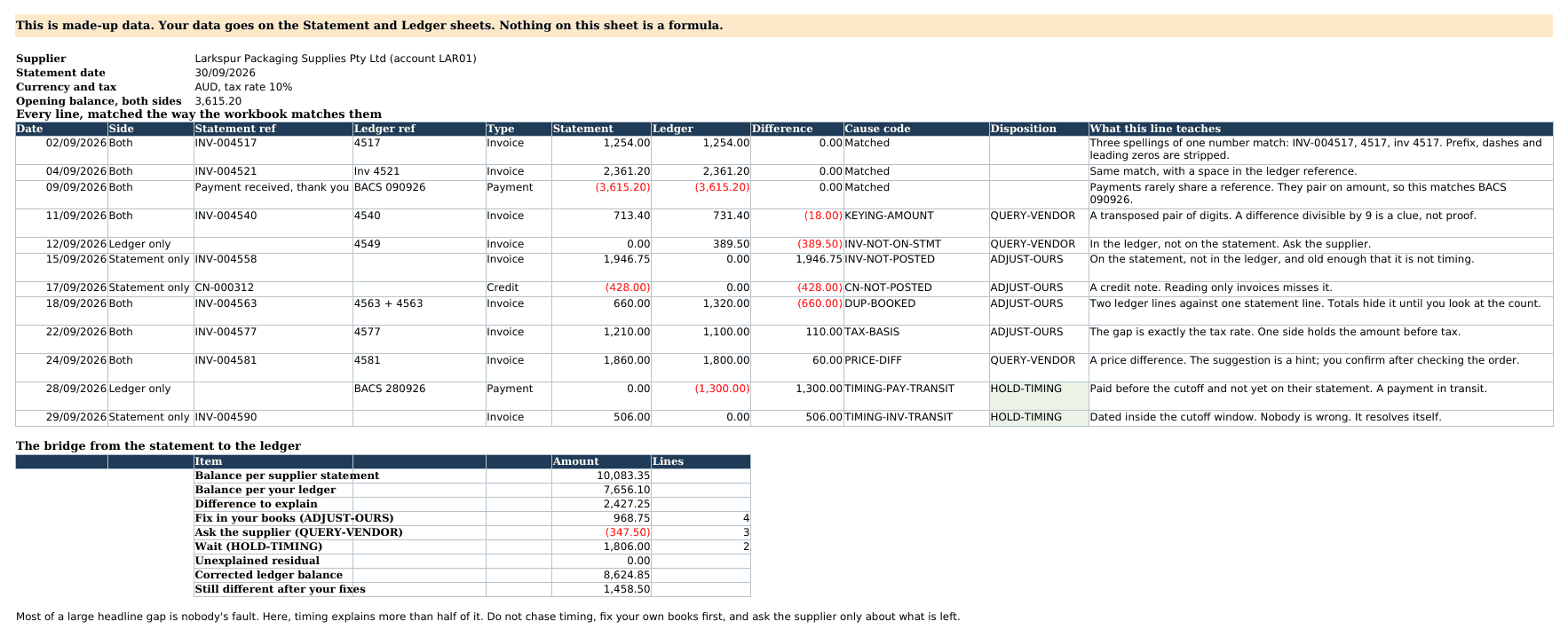
The Pemberton September statement, fully reconciled
Here is the finished case first. Ridgeway Cabinet Works buys fixings from Pemberton on account RCW-8814, in Australian dollars, GST included in every amount. The statement is a balance-forward one dated 30 Sep 2026. It opens on 5,274.30, lists the month’s activity and closes on 11,078.45. The purchase ledger, run as at the same date, closes on 7,082.30.
All the names, references and amounts here are made up, as they are on the workbook’s Example sheet. The GST treatment is general information, not tax advice.
Swipe sideways to see every column.
| Next move | Lines | Amount | What happens |
|---|---|---|---|
| Post on our side | 4 | 1,053.80 | Post invoice PF/31890, post credit note PF/C0415, void the duplicate PF/31914A, re-enter PF/31931 with GST |
| Ask the supplier | 2 | 111.00 | Confirm the total on PF/31871 (45.00), then agree the unit price on PF/31952 (66.00) |
| Wait for timing | 2 | 2,831.35 | Payment RCPT 90388 sent on 29 Sep, and invoice PF/31977 dated on the cut-off |
| Total explained | 8 | 3,996.15 | Unexplained: 0.00 |
Most of the gap, 2,831.35 or about 71 percent, is timing, and nobody made a mistake there. Ridgeway’s payment had not reached Pemberton’s books when the statement ran, and an invoice dated on the last day had not arrived. The postings are routine. The only real conversation with the supplier is about a unit price.
Swipe sideways to see every column.
| Reference | Status | Pemberton statement | Ridgeway ledger | Note |
|---|---|---|---|---|
| Opening balance | Matched | 5,274.30 | 5,274.30 | 1 Sep, agreed |
| PF/31842 | Matched | 1,486.20 | 1,486.20 | |
| PF/31857 | Matched | 2,318.75 | 2,318.75 | |
| RCPT 90312 | Matched | -5,274.30 | -5,274.30 | Payment, paired on amount |
| PF/31871 | Differs | 1,672.30 | 1,627.30 | Digits swapped |
| PF/31890 | Missing | 2,094.60 | not listed | Never posted |
| PF/C0415 | Missing | -388.80 | not listed | Credit note not posted |
| PF/31914 | Matched | 761.40 | 761.40 | |
| PF/31914A | Missing | not listed | 761.40 | Same invoice keyed again |
| PF/31931 | Differs | 1,203.40 | 1,094.00 | Ledger entered without GST |
| PF/31952 | Query | 1,418.00 | 1,352.00 | Unit price 14.18 against 13.52 |
| RCPT 90388 | Missing | not listed | -2,318.75 | Sent 29 Sep, timing |
| PF/31977 | Missing | 512.60 | not listed | Dated 30 Sep, timing |
| Total | 11,078.45 | 7,082.30 |
After the four postings the ledger reads 8,136.10 and the sheet’s Still different line shows 2,942.35. Pemberton then confirms the 1,672.30 on PF/31871, so you post the 45.00 correction. The ledger goes to 8,181.10 and Still different drops to 2,897.35. Two things remain open: the 2,831.35 of timing and the 66.00 price question.
How do you reconcile a supplier statement in Excel? Get both sides ready
Run your ledger as at the statement date, 30 Sep here, and hold your side to it. If you run it on the 3rd, it picks up payments and invoices that the statement could not have known about. You then spend time chasing differences that were created by the later run date.
Read the statement before you copy it
A one-page balance-forward statement from Pemberton Fastenings Pty Ltd dated 30 September 2026. It opens at 5,274.30 and closes at 11,078.45. Seven numbered notes mark the opening balance, an invoice, a payment, a credit note, a GST note, a cut-off invoice and the closing balance.
Swipe sideways to see every column.
Pemberton Fastenings Pty Ltd
Statement for Ridgeway Cabinet Works Pty Ltd, account RCW-8814
Statement of account
30 Sep 2026
| Date | Reference | Description | Debit | Credit | Balance |
|---|---|---|---|---|---|
| 01 Sep | Balance brought forwardNote 1 | 5,274.30 | |||
| 08 Sep | PF/31842 | InvoiceNote 2 | 1,486.20 | 6,760.50 | |
| 10 Sep | PF/31857 | Invoice | 2,318.75 | 9,079.25 | |
| 12 Sep | RCPT 90312 | Payment receivedNote 3 | 5,274.30 | 3,804.95 | |
| 15 Sep | PF/31871 | Invoice | 1,672.30 | 5,477.25 | |
| 17 Sep | PF/31890 | Invoice | 2,094.60 | 7,571.85 | |
| 19 Sep | PF/C0415 | Credit note, returned cartonsNote 4 | 388.80 | 7,183.05 | |
| 22 Sep | PF/31914 | Invoice | 761.40 | 7,944.45 | |
| 25 Sep | PF/31931 | InvoiceNote 5 | 1,203.40 | 9,147.85 | |
| 26 Sep | PF/31952 | Invoice, 100 units at 14.18 including GST | 1,418.00 | 10,565.85 | |
| 30 Sep | PF/31977 | Invoice, dated on the cut-offNote 6 | 512.60 | 11,078.45 | |
| Closing balanceNote 7 | 11,078.45 | ||||
- Note 1The opening balance must equal last month’s closing balance on your records. If it does not, stop here: every later line inherits the error.
- Note 2The original also prints a Due Date column, 30 days after each invoice date. The date on the left is the invoice date. Ignore the due date.
- Note 3A payment sits in the Credit column. In the sheet it goes in as a negative amount, typed as a Payment.
- Note 4A credit note also sits in the Credit column. It is a negative amount typed as a Credit, so it never pairs with an invoice that shares its number.
- Note 5Every amount on this statement includes GST. Check whether your ledger line holds the gross amount before you call a gap a difference.
- Note 6An invoice dated on the cut-off may not have reached you. Note it, and expect it to appear as timing.
- Note 7This is the number you reconcile to. Opening balance plus every line must land on it.
Before you paste anything, add the statement lines to the opening balance. You should land on 11,078.45. If you do not, you have misread a line, or the supplier's statement does not add up in the first place. Sort that out now. If you leave it, the Checks sheet will flag it later and it will be more annoying then. Some suppliers send an open-item statement. It lists only what is still unpaid and has no payments on it. With those, put 0.00 in both opening balances and run an open-items report from your ledger as at the same date.
Pull your side of the ledger
You need every bill, credit note and payment for this supplier in the statement period, plus the opening and closing balances. Which report you need depends on the software. The guide for Xero and the guide for QuickBooks Online go step by step, and the cards below give the short version.
Xero
Checked
Payable Invoice Detail
Reporting > All reports, then search for the report by name
In Xero’s Demo Company on 31 October 2026 it listed paid bills next to approved, awaiting approval and draft ones, with a Status column, and no payment lines. Filter out drafts. For the payments on a statement, run Supplier Bill Activity for the supplier. For an open-item statement, use Aged Payables Detail as at the statement date. Export as Excel or Google Sheets.
Source: Xero Central, Select contents and display order in a new report, and Xero’s Demo Company (AU)
QuickBooks Online
Checked
Vendor Balance Detail
Reports > Standard reports, search for balance detail, then choose Vendor Balance Detail
In Intuit’s Test Drive sample company on 31 October 2026, run for all dates, it listed only bills with an open balance and no payments. For a statement that shows payments, also run Transaction List by Vendor, which Intuit Community answers say gives each payment its own row. Export either one from the report’s Export dropdown as Excel.
Source: Intuit help, Print a customer or vendor register, updated 8/3/2026, and the QuickBooks Online Test Drive sample company
For Vista, report setups differ between installations, so we give no click path here. The Vista page explains the daily feed instead.
Paste, match and read the status
Fill the Reconciliation header
Supplier name, account RCW-8814, statement date 30 Sep 2026, AUD on both currency cells. Opening balances: 5,274.30 on each side. Closing balances: 11,078.45 per the statement and 7,082.30 per the ledger.
Paste the statement
Ten lines into Statement columns A to D, leaving out the opening line because you entered it in step 1. Invoices are positive. Credit notes and payments are negative. Pick Invoice, Credit or Payment in column C.
Paste the ledger
Nine lines into Ledger columns A to D, on the same sign rule. If one side stores credits as positives, flip them while you paste. Mixed signs often stop a first reconciliation from balancing, because every credit then shows as a difference of twice its value.
Read the Status column
The sheet matches on reference first, then amount, and writes a status against every line. Anything that is not Matched needs a decision from you.
Before any cause code is typed, the Reconciliation sheet shows an unexplained residual of 3,996.15 and the words NOT SIGNABLE. Two checks are failing at that point, because the bridge does not foot and eight differences have no code. Do not clear it by editing balances. Code the lines. We recalculated this exact case in LibreOffice to confirm these results.
Swipe sideways to see every column.
| Status | Where it appears | What to check first |
|---|---|---|
| Matched | Statement | Nothing. Same document, same amount. |
| Statement only | Statement | Whether the document is in your inbox, unposted, or still on its way |
| Amount differs | Statement | The gap itself: a digit swap, a tax-rate gap or a price |
| Check duplicates | Statement | Two or more ledger lines share the same reference |
| Listed twice | Statement | The supplier printed one document twice on the statement |
| Ledger only | Ledger | A payment near the cut-off, a duplicate, or a bill on the wrong supplier |
| On statement | Ledger | Nothing. It has a partner on the Statement sheet. |
The Pemberton case has a trap. The duplicate PF/31914A does not show up as Check duplicates, because its reference differs from PF/31914. It appears as Ledger only, with a suggested cause of INV-NOT-ON-STMT. Nothing in a formula connects the A to the original. A person sees that the amount is identical to PF/31914 and codes it DUP-BOOKED instead. The suggested cause is a hint. It never fills in your cause code.
Why do supplier and ledger balances differ?
Eight differences, eight different causes. Real accounts often repeat themselves, with the same unposted credit notes or the same tax slip month after month, but this statement has no repeats. The Cause codes sheet lists 31 and the Read me suggests starting with eight. These are the eight this statement produced.
Swipe sideways to see every column.
| Cause code | What you see in the sheet | Next move in the sheet | In this case |
|---|---|---|---|
| INV-NOT-POSTED | Statement only, an invoice older than the timing window | Adjust ours | PF/31890, 2,094.60, sat in a shared inbox |
| CN-NOT-POSTED | Statement only, typed as a Credit | Adjust ours | PF/C0415, minus 388.80, returned cartons |
| DUP-BOOKED | Ledger only, an invoice repeating an amount | Adjust ours | PF/31914A, 761.40, keyed a second time |
| TAX-BASIS | Amount differs by exactly the tax rate | Adjust ours | PF/31931, 109.40 is 10 percent of 1,094.00 (the GST rate) |
| KEYING-AMOUNT | Amount differs, gap divisible by 9 | Query vendor | PF/31871, 45.00, digits 7 and 2 swapped |
| PRICE-DIFF | Amount differs with no pattern | Query vendor | PF/31952, 66.00, 100 units at 14.18 against 13.52 |
| TIMING-PAY-TRANSIT | Ledger only, a payment near the cut-off | Hold timing | RCPT 90388, 2,318.75, sent on 29 Sep |
| TIMING-INV-TRANSIT | Statement only, dated inside the timing window | Hold timing | PF/31977, 512.60, dated 30 Sep |
Worked example
Three lines that all say “Amount differs”
Swipe sideways to see every column.
| Reference | Date | Statement | Ledger | What it tells you |
|---|---|---|---|---|
| PF/31871 | 15 Sep | 1,672.30 | 1,627.30 | Gap 45.00. The gap in cents divides by 9 and both numbers have the same length, which points at two swapped digits. |
| PF/31931 | 25 Sep | 1,203.40 | 1,094.00 | Gap 109.40, exactly 10 percent of 1,094.00. The bill went in without GST. |
| PF/31952 | 26 Sep | 1,418.00 | 1,352.00 | Gap 66.00. No digit pattern, no tax rate. It is 100 units at 0.66 more than the order price, per unit with GST included. |
A gap divisible by 9 hints at swapped digits. It is a clue, not proof, so confirm the amount with the supplier before you change the bill.
Two causes did not turn up here but will in your own work: a sign flip and a bill posted to the wrong supplier. The guides on missing credit notes and duplicate payments and on common reconciliation problems cover more. To see how each one looks on a statement, use the exception types in the cheat sheet. Every cause has a code, an owner and ready wording on the Cause codes sheet.
How do you know the reconciliation is right?
Type the eight codes and the sheet recalculates. The unexplained residual drops to 0.00, but one check still fails: the two lines marked for the supplier have not been raised. Once the query below has been sent, put Yes in the Query raised column on PF/31871 and PF/31952. All twelve checks then read PASS, and the sign-off cell changes to SIGNABLE.
The residual is the statement balance minus the ledger balance minus every difference you have coded. If it is not zero, a line is missing from your paste, a balance is mistyped, or a sign is wrong.
A zero residual means every dollar of the gap has a cause. It says nothing about how many causes there are. In the Pemberton case the net gap is 3,996.15 but the exceptions total 6,296.55 when you ignore their signs. 5,146.35 pushes the statement above the ledger and 1,150.20 pushes it below, which is the 388.80 credit note plus the 761.40 duplicate. Make those two a little bigger and the net could shrink toward nothing while eight problems stayed in the books. So look at the count of exceptions as well as the total. The Reconciliation sheet shows it.
A decision flow. If a document is on both sides, check the amount gap and ask the supplier if it is a price. If the statement lists it and the ledger does not, a document dated near the cut-off is timing and anything older is posted. If only the ledger holds it, a payment near the cut-off is timing and anything else is checked for a duplicate or wrong supplier, then queried. Every path ends with a cause code and a next move.
- 1A line is not Matched
- 2DecisionIs the document on both sides?Yes: go to step 3No: go to step 4
- 3Read the gap: tax rate, swapped digits, or neither. Ask the supplier when it is neither.
- 4DecisionDoes the statement list it and your ledger not?Yes: go to step 5No: go to step 6
- 5DecisionIs it dated within a few days of the cut-off?Yes: go to step 7No: go to step 8
- 6DecisionIs it a payment sent just before the cut-off?Yes: go to step 7No: go to step 9
- 7Hold it as timing and look again on the next statement.
- 8Find the document, check it and post it. A credit note is posted the same way.
- 9Look for a double entry or a posting to another supplier. If neither, ask the supplier.
- 10The line has a cause code and a next move
Email the supplier, then sign off
Post your own corrections first, and leave timing alone. Then send the supplier only the lines that need their answer, and mark those two lines Yes in the Query raised column. The Chase list sheet collects them and offers wording, and the note below is that wording filled in for the Pemberton case.
Once the query is sent and marked, sign it off. The Reconciliation sheet has a Prepared by line and a Reviewed by line, and the reviewer should be someone other than the preparer. It prints on two pages. The first is the bridge that proves the balances. The second has the actions, the ageing of unresolved items and the signatures. Keep the print with the statement PDF. How often to do this, and which suppliers need it before each payment run, is in the month-end checklist.
How the formulas work
You can use the workbook without reading a formula. This section is for the day you adapt it. The table shows the pattern behind three of them, simplified: the real column letters differ.
Swipe sideways to see every column.
| Job | Pattern | In plain words |
|---|---|---|
| Pull the ledger amount | =SUMIFS(LedgerAmount, LedgerKey, ThisKey) | Adds every ledger line carrying this match key |
| Count the ledger lines | =COUNTIFS(LedgerKey, ThisKey) | Zero means the ledger has nothing for it |
| Write the status | =IF(Count=0, "Statement only", IF(ABS(Gap)<0.005, "Matched", "Amount differs")) | Words, not colours, so it still reads when printed in black and white |
The sheet compares totals per document number, not row against row. A row-by-row tick-off would match both copies of a bill booked twice under the same reference. Compared by total, 1,522.80 against a statement line of 761.40 shows up straight away, and the status reads Check duplicates.
To build the match key the sheet takes out spaces and punctuation, drops any letters before the first digit, and removes leading zeros. It goes wrong in two cases. If someone types a capital O instead of a zero, 4O17 and 4017 look like different documents. And a reference with a suffix, like 4541-1, turns into 45411, which can collide with a different bill. For either one, type any word in the Match key override column on both rows and the sheet will pair them.
We would have liked XLOOKUP, because it makes the pull a shorter formula and it works in Google Sheets. But Microsoft's XLOOKUP page lists it as unavailable in Excel 2016 and 2019. A colleague on an older copy would open the file and get errors. So the sheet uses SUMIFS and COUNTIFS, which are longer but work everywhere.
Does it work in Google Sheets and older Excel?
The workbook sticks to common functions: SUMIFS, COUNTIFS, INDEX, MATCH, IF and their usual neighbours. There are no macros, no tables, no sheet protection and no add-ins. In Excel, open the file and start at the Reconciliation sheet.
Steps to open it in Google Sheets: upload the .xlsx to Google Drive, double-click it, then choose File and Save as Google Sheets. Or, in an open Sheets file, choose File, Import and pick Create new spreadsheet (as of 30 Oct 2026, per Google Docs Editors Help).
Printing needs one habit. The data sheets print all 300 rows, so select the filled rows and use Print selection. The Reconciliation sheet needs nothing and prints on two pages.
When is a spreadsheet the wrong tool?
One copy of the file holds 300 lines a side and 150 exceptions, for one supplier in one currency. Most people get annoyed at the retyping well before they hit those limits. If you reconcile a few suppliers a month and can copy the statement lines straight out of the PDF, the sheet does the job. If you have dozens of suppliers, each with a different PDF layout, you will spend the month retyping.
Where Statement Zen fits
We make Statement Zen, which does the typing for you. A PDF like the Pemberton one, with its 11 lines and 11,078.45 closing balance, can be forwarded by email. It is then matched against your ledger in Xero, QuickBooks Online or Vista, and the differences wait in your dashboard. The details are on the page to reconcile Xero supplier statements automatically and the QuickBooks Online reconciliation page. Send one statement through the free reconciliation, and check what it costs on the pricing page.
Questions people ask
How do I reconcile a supplier statement in Excel?
Does it handle balance-forward and open-item statements?
Which sign do credit notes and payments take?
What if I only have the supplier statement as a PDF?
Does it work in Google Sheets and older versions of Excel?
How often should I run a supplier statement reconciliation?
Who should sign off the reconciliation?
Can I reconcile a supplier that bills in another currency?
About the author
Michael Usov, Founder, Statement Zen
Michael Usov founded Statement Zen, which reconciles supplier statements against your accounts payable ledger. He also runs MRU Consulting, which builds accounts payable and ERP integrations, including for construction businesses on Viewpoint Vista. For the last fifteen years he has worked with finance controllers and AP managers in construction companies, doing and automating supplier statement reconciliation and other accounting tasks.
Sources
- Microsoft Support: XLOOKUP function, read
- Google Docs Editors Help: XLOOKUP, read
- Xero Central: Select contents and display order in a new report, read
- Google Docs Editors Help: Use both Excel & Sheets, read
- Australian Taxation Office: How GST works (rate of 10 percent), read
- Xero Central: Payable Invoice Detail report (US version of the article), read
- Intuit: Print a customer or vendor register, read
- Intuit: Export reports to Excel in QuickBooks Online, read
What changed
- : First published, alongside version 2 of the workbook (nine sheets, 31 cause codes, 12 checks).
- : Ran Payable Invoice Detail in Xero’s Demo Company (AU) and Vendor Balance Detail in Intuit’s Test Drive company, and replaced the hedged notes on both cards with what each report showed.
Read next
- How to Reconcile a Supplier Statement, With a Full Worked ExampleRead next if you want the full method, step by step, before you open the sheet.
- How Supplier Statement Matching Works: References, Amounts, Dates and Part PaymentsGo deeper on why lines pair by reference first and amount second, and where that breaks.
- Supplier Statement Reconciliation Checklist for Month-End and Before the Payment RunUse this beside the template for the month-end routine and the payment-run check.