Xero
How to Reconcile Supplier Statements in Xero, With a Worked Example
For a statement that lists only unpaid items, run Aged Payables Detail as at the statement date. For a statement that lists payments, run an activity report for the period. We found no supplier statement matching in Xero’s published help (checked 30 October 2026), so the comparison is yours to do. It is the general method with Xero’s report names filled in.
We work through an eight-line statement from a hydraulics supplier that is $2,182.75 above Xero, where five separate causes add up to the gap.
By Michael Usov, FounderPublished Updated 19 min read
Key takeaways
- Match the report to the statement. An open-item statement goes against Aged Payables Detail run as at the statement date. A statement with payments needs an activity report for the period.
- Look in the Draft tab before anything else. Bills in Draft stay off your payables reports.
- Agreeing totals prove little. A missing bill and a duplicate can offset each other, exactly or in part, so tick off the lines.
- Give every difference a cause and an owner: you, the supplier, or nobody because it is timing. In the worked example one difference of 145.35 stays open until the supplier answers.
On this page
Does Xero reconcile supplier statements?
Short answer
Can you reconcile supplier statements in Xero?
For a statement that lists only unpaid items, run Aged Payables Detail as at the statement date. For a statement that lists payments, run an activity report for the period. Xero’s published help describes no supplier statement matching (checked 30 October 2026). So compare the report with the statement line by line, and write down a cause for each difference.
The word “reconcile” misleads here. In Xero it normally means bank reconciliation: matching lines from a bank feed to transactions in your books.
Customer statements exist. Xero’s help describes two types, Activity and Outstanding, which you send to the people who owe you money. We found no supplier-side equivalent in the published help.
Swipe sideways to see every column.
| In Xero | What it does | Why it is not the supplier check |
|---|---|---|
| Bank reconciliation | Matches bank statement lines to transactions in your books | It checks the bank account. |
| Customer statement | You send it to customers, as an Activity or Outstanding statement | It runs the other direction. The supplier’s version arrives as a PDF that you have to read yourself. |
| Aged Payables reports | List what you owe each supplier, aged, as at a date | It is your record only. |
Which Xero report matches which supplier statement?
Statements usually come in one of two shapes, and the shape decides the report. An open-item statement lists only what is unpaid. Garrity Valve & Hose sends this kind. It has seven lines, no opening balance, no payments, and a total of 6,665.95 at 31 August 2026.
A balance-forward statement starts from an opening balance and then lists invoices, credits and payments down to a closing balance. Merrin Hydraulics sends that shape, and it is the one in the worked example further down.
Swipe sideways to see every column.
| Reference | Date | Amount |
|---|---|---|
| GVH-9120 | 22 Jul 2026 | 1,134.20 |
| GVH-9138 | 30 Jul 2026 | 865.45 |
| GVH-9147 | 05 Aug 2026 | 2,408.10 |
| GVH-9163 | 12 Aug 2026 | 596.75 |
| GVH-9171 | 19 Aug 2026 | 1,317.60 |
| GVH-9189 | 26 Aug 2026 | 742.35 |
| GVH-CR0614 | 28 Aug 2026 | −398.50 |
| Total owed | 31 Aug 2026 | 6,665.95 |
For that statement, run Aged Payables Detail for Garrity only, as at 31 August 2026. The seven lines should come back with the same total.
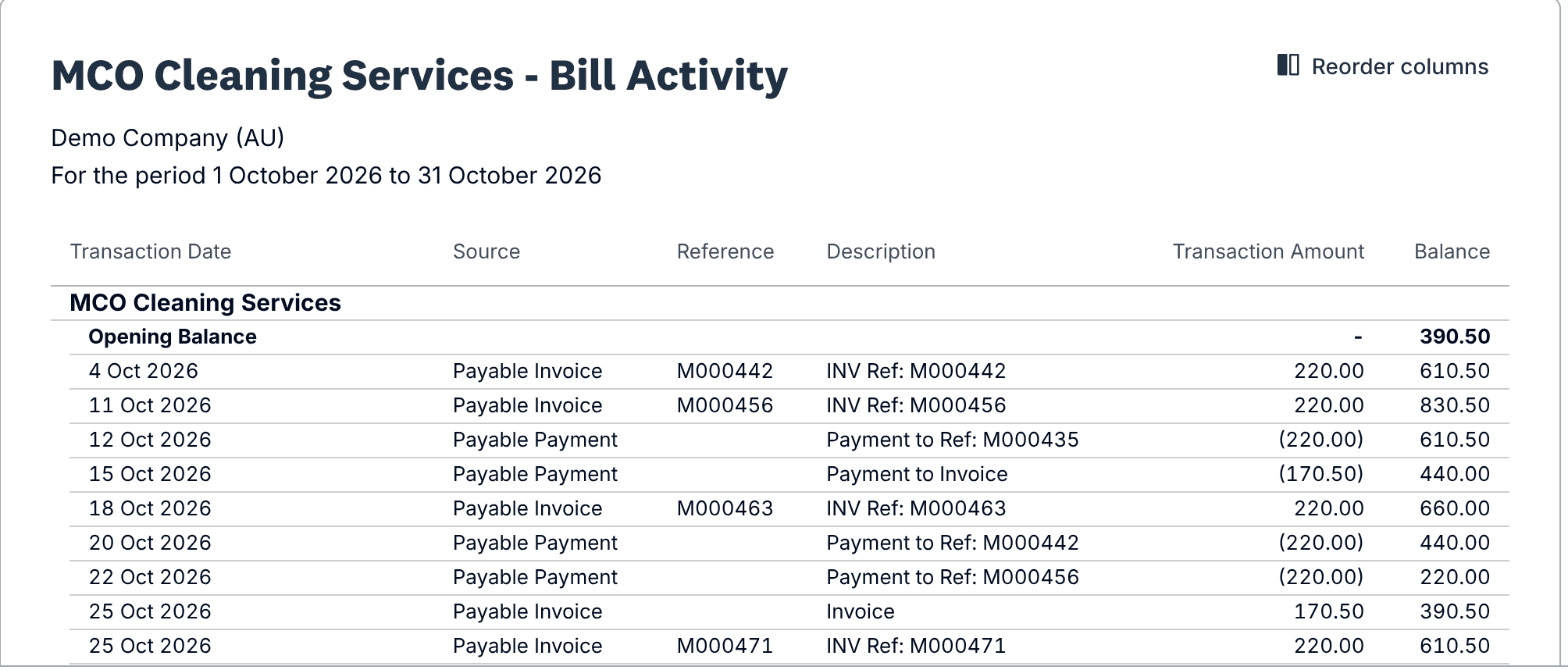
The balance-forward statement is harder, because it carries payments and a period. Start with Supplier Bill Activity. It lists one supplier’s bills and bill payments over a period, with an opening and a running balance, so it reads like the statement.
It does not show every payment. When we ran it in Xero’s Demo Company (AU), a spend-money payment was missing from it and showed in Contact Cash Activity instead. So run both reports for the period and read them together against the statement.
Xero Central lists Supplier Bill Activity with the Contact Transactions reports: open Reporting, then All reports, search for it, pick a contact and a date range, and click Update.
Two more reports help. Payable Invoice Detail lists bills and credit notes, paid or not, but no payments. Account Transactions, set to your Accounts Payable account and filtered to one contact, lists bill payments beside the bills they settle.
A decision flow. It starts with a statement arriving and asks whether the statement lists an opening balance and payments. If yes, pull the supplier’s activity for the period using Supplier Bill Activity, and add Contact Cash Activity for payments made as spend money. If no, run Aged Payables Detail as at the statement date for that supplier. Both paths then ask whether the supplier bills in a foreign currency. If yes, match on reference first because reports may show base currency only. Then tick off line by line and name a cause for every difference.
- 1Supplier statement arrives
- 2DecisionDoes it list an opening balance and payments?Yes: go to step 3No: go to step 4
- 3Balance-forward: run Supplier Bill Activity for that supplier and period, then check Contact Cash Activity for spend-money payments
- 4Open-item: run Aged Payables Detail for that supplier as at the statement date
- 5DecisionDoes the supplier bill in a foreign currency?Yes: go to step 6No: go to step 7
- 6Match on reference first. Reports may show base currency only, so amounts will differ by the rate
- 7Tick off line by line: reference, then amount, then date
- 8Name a cause and an owner for every difference
Aged Payables or Aged Creditors is the same report under two names. The glossary entry sorts out which name goes with which country.
Xero
Checked
Aged Payables Detail
Reporting > All reports, then search for the report name
Set the date to the statement date and filter to one contact. Use it for an open-item statement, which lists only what is still unpaid.
Source: Xero Central, Aged Payables Detail report, checked 30 Oct 2026; name found in Xero’s Demo Company (AU) report search, 31 Oct 2026
Xero
Checked
Supplier Bill Activity
Reporting > All reports, then search for the report name
Choose the supplier and a date range. In the demo company it showed an opening balance, each bill, each bill payment and a running balance, which is the layout of a balance-forward statement. A spend-money payment did not appear in it.
Source: Xero Central, Contact transactions reports, checked 30 Oct 2026; run checked in Xero’s Demo Company (AU), 31 Oct 2026
Xero
Checked
Contact Cash Activity
Reporting > All reports, then search for the report name
Run it for the same supplier and period. In the demo company it listed a spend-money payment of 1,650.00 that Supplier Bill Activity left out, and no bill payments. Between the two reports you see every payment to the supplier.
Source: Xero Central, Contact transactions reports, checked 30 Oct 2026; run checked in Xero’s Demo Company (AU), 31 Oct 2026
Xero
Checked
Payable Invoice Detail
Reporting > All reports, then search for the report name
In the demo company it listed paid bills next to approved, awaiting approval and draft ones, with a Status column, and no payment lines. Filter out drafts before you compare it with a statement. Xero Central says it also includes deleted and voided bills until you filter them out.
Source: Xero Central, Payable Invoice Detail report, checked 30 Oct 2026; run checked in Xero’s Demo Company (AU), 31 Oct 2026
Xero
Checked
Account Transactions
Reporting > All reports, then search for the report name
Set Accounts to Accounts Payable and pick the date range. In the demo company it listed bills, credit notes and bill payments with a running balance, 100 lines to a page with more pages after. Filter to one contact to use it for a single supplier.
Source: Xero Central, Account Transactions report, checked 30 Oct 2026; run checked in Xero’s Demo Company (AU), 31 Oct 2026
Swipe sideways to see every column.
| Report | What it lists | Best used for | As at a date or for a period |
|---|---|---|---|
| Aged Payables Detail | What you still owe, bill by bill (from Xero Central, not run) | An open-item statement | As at a date |
| Supplier Bill Activity | One supplier’s bills and bill payments, with an opening and a running balance. No spend money | A balance-forward statement | A date range |
| Contact Cash Activity | Spend money paid to a contact. No bill payments | Payments made outside Pay bills | A period |
| Payable Invoice Detail | Bills and credit notes, paid or not, with a status. No payments | A cross-check on the bills a statement lists | A period |
| Account Transactions | Bills, credit notes and bill payments on the Accounts Payable account | A second look at one supplier | A date range |
Three checks before you open a report
- Open Purchases, then Bills, then the Draft tab. Approve or delete anything from this supplier that is sitting there.
- Check that the supplier’s payments are matched on the bank reconciliation. A payment that is in the bank feed but not applied to the bill leaves the bill looking unpaid.
- Search your contacts for the supplier’s trading name and its legal name. Bills split across two records produce a short balance on both.
The method, one statement at a time
Write down three numbers
The statement date, the period, and the closing balance printed on the page. Add the currency if it is not your own.
Run the report for that supplier only
Go to Reporting, then All reports, open the report, set the date or period and the contact, and click Update. If the statement lists open items, use the statement date rather than today’s date.
Compare the totals, then keep going
If the two totals agree, spot-check the oldest items anyway. A missing invoice and a duplicate bill can offset each other.
Tick off by reference, then amount, then date
Start with the supplier’s reference. If it is not in Xero, look for the same amount on the same date. Some people type a purchase order number into the Reference field instead of the invoice number, so a bill can sit under a reference the supplier has never seen.
Move to a sheet once the statement runs past about fifteen lines
Under fifteen lines, a printout and a pen are quicker. Beyond that, export both lists from the reports (Xero offers PDF, Excel and Google Sheets) and put them side by side. The free spreadsheet template has the columns laid out. In the sheet, pull the Xero amount in beside each statement reference with =XLOOKUP(A2, XeroRefs, XeroAmounts, "not in Xero") in Excel 2021, Microsoft 365 or Google Sheets. Any row that says "not in Xero" is a line to chase.
Give every difference a cause
Typical causes are a bill or credit note that is missing from Xero, a duplicate in Xero, an amount that differs, a timing gap, or something only the supplier can explain. If a difference has no cause written beside it, you haven’t finished with it.
Fix what is yours, query the rest, file the working
Post, correct, allocate or void in Xero. Email the supplier about what is theirs. Keep the statement PDF and your tick-off sheet together and dated, so next month’s opening balance has something to be checked against.
Reconciliation workbook
A spreadsheet to paste the statement and the Xero export into and tick off line by line.
Excel workbook (.xlsx)
Swipe sideways to see every column.
| Line | Merrin example | What goes here |
|---|---|---|
| Balance per supplier statement | 6,414.35 | The closing balance printed on the page. |
| Less: statement items not in Xero, or higher than Xero | −2,208.80 | Draft bills, bills not entered, a quantity or price that differs. Merrin: 2,063.45 + 145.35. |
| Add: credits not entered, and duplicates in Xero | +1,272.40 | Merrin: credit note 314.60 + duplicate bill 957.80. |
| Less: payments in Xero not yet on the statement | −1,246.35 | Payments made after the supplier’s cut-off. |
| Balance per Xero | 4,231.60 | From the report, as at the statement date. |
| Unexplained difference | 0.00 | It should be nil. Anything else has a cause you have not found yet. |
Merrin Hydraulics, September 2026: eight lines, five causes
Fenwick Reach Fabrication buys couplings and hose fittings from Merrin Hydraulics on account FRF-2207. Both businesses are invented for this guide, and so is every figure. Merrin’s statement is dated 30 September 2026 and closes at 6,414.35. Fenwick Reach’s Xero balance for Merrin is 4,231.60. The statement is 2,182.75 higher.
A supplier statement from Merrin Hydraulics with eight lines. It opens at 3,418.90 and lists five invoices, a payment of 3,418.90 and a credit note of 314.60, and closes at 6,414.35. Four lines carry numbered markers.
Swipe sideways to see every column.
Merrin Hydraulics Pty Ltd
Statement of account
30 Sep 2026
| Date | Reference | Description | Debit | Credit | Balance |
|---|---|---|---|---|---|
| 01 Sep | Opening | Opening balance | 3,418.90 | ||
| 04 Sep | MHY3071 | InvoiceNote 4 | 1,246.35 | 4,665.25 | |
| 09 Sep | MHY3084 | Invoice, 6 couplings at 145.35Note 1 | 872.10 | 5,537.35 | |
| 14 Sep | EFT | Payment received | 3,418.90 | 2,118.45 | |
| 18 Sep | MHY3102 | InvoiceNote 2 | 2,063.45 | 4,181.90 | |
| 21 Sep | MHY-CR219 | Credit note, wrong fittings returnedNote 3 | 314.60 | 3,867.30 | |
| 24 Sep | MHY3117 | Invoice | 957.80 | 4,825.10 | |
| 28 Sep | MHY3125 | Invoice | 1,589.25 | 6,414.35 | |
| Closing balance | 6,414.35 | ||||
- Note 1Six couplings billed at 145.35 each. Xero holds a bill for five.
- Note 2In Xero this bill is still a Draft, so the report leaves it out.
- Note 3A credit for wrong fittings that were sent back. Nobody has entered it in Xero.
- Note 4Still open on the statement. Fenwick Reach paid it on 29 September.
Swipe sideways to see every column.
| Date | Reference and description | Amount | Running balance |
|---|---|---|---|
| 01 Sep | Opening balance | 3,418.90 | 3,418.90 |
| 04 Sep | MHY3071 Bill | 1,246.35 | 4,665.25 |
| 09 Sep | MHY3084 Bill, 5 couplings at 145.35 | 726.75 | 5,392.00 |
| 14 Sep | EFT Payment | −3,418.90 | 1,973.10 |
| 24 Sep | MHY3117 Bill | 957.80 | 2,930.90 |
| 25 Sep | MHY 3117 Bill, the same invoice entered again with a space | 957.80 | 3,888.70 |
| 28 Sep | MHY3125 Bill | 1,589.25 | 5,477.95 |
| 29 Sep | EFT Payment sent, pays MHY3071 | −1,246.35 | 4,231.60 |
Swipe sideways to see every column.
| Reference | Status | Merrin statement | Xero | Note |
|---|---|---|---|---|
| Opening balance | Matched | 3,418.90 | 3,418.90 | |
| MHY3071 | Matched | 1,246.35 | 1,246.35 | |
| MHY3084 | Differs | 872.10 | 726.75 | Statement bills 6 couplings, Xero holds 5 |
| EFT 14 Sep | Matched | −3,418.90 | −3,418.90 | |
| MHY3102 | Missing | 2,063.45 | not listed | A Draft bill in Xero |
| MHY-CR219 | Missing | −314.60 | not listed | Credit note not entered |
| MHY3117 | Matched | 957.80 | 957.80 | |
| MHY 3117 | Missing | not listed | 957.80 | The same invoice keyed a second time |
| MHY3125 | Matched | 1,589.25 | 1,589.25 | |
| EFT 29 Sep | Query | not listed | −1,246.35 | Paid after the supplier’s cut-off |
| Total | 6,414.35 | 4,231.60 |
Five differences, three different owners
The table walks from the Xero balance to the statement balance, one cause at a time, and ends on 6,414.35.
Swipe sideways to see every column.
| Step | Amount | Running balance | Who acts, and what they do |
|---|---|---|---|
| Xero balance, 30 Sep 2026 | Start | 4,231.60 | Starting point. |
| MHY3084: 6 couplings billed, 5 entered | +145.35 | 4,376.95 | The supplier. Ask about the sixth coupling before changing the bill. |
| MHY3102 sitting in Draft | +2,063.45 | 6,440.40 | You. Approve the draft bill. |
| MHY-CR219 credit note not entered | −314.60 | 6,125.80 | You. Enter the credit note, then allocate it. |
| MHY3117 entered twice | −957.80 | 5,168.00 | You. Void the second bill. |
| Payment of 29 Sep not on the statement | +1,246.35 | 6,414.35 | Nobody. It appears on October’s statement. |
| Statement balance, 30 Sep 2026 | End | 6,414.35 | The two balances now agree. |
Three of the five are yours to fix: approving MHY3102 lifts Xero by 2,063.45, entering MHY-CR219 takes off 314.60, and voiding the second MHY 3117 takes off 957.80. After that Xero reads 5,022.65.
Once the 29 September payment reaches Merrin, their statement would read 5,168.00, and the 145.35 left between that and Xero’s 5,022.65 is the one coupling. We would not edit the bill from five couplings to six just because the statement says six.
The one line that is the supplier’s
Why doesn’t my supplier statement match Xero?
Merrin’s statement had five causes. Problems that turn up in any ledger are in the common reconciliation problems guide.
Swipe sideways to see every column.
| Cause | What it looks like | Where to look in Xero | Who acts |
|---|---|---|---|
| Bill still in Draft | On the statement, absent from the payables report | Purchases, Bills, Draft tab | You approve it, same day |
| Supplier set up twice | Some bills under one name, some under another, both balances short | Contacts, searching the trading and legal names | You, after choosing which record to keep. Follow the contact merge steps in Xero Central |
| Credit note not entered | A credit on the statement and nothing in Xero | The negative lines on Aged Payables Detail for that supplier | You, as soon as the document is in hand |
| Credit entered, not allocated | A negative line on the report while the bill it should reduce still shows in full | The credit’s own page, then the bill it should reduce | You, same day |
| Duplicate bill | Two bills, same supplier and amount, references that differ by a space or a prefix | Purchases, Bills, menu icon, Review duplicate bills, then compare references by eye | You void one, after checking neither is paid |
| Payment not tied to the bill | The bank shows it paid and Xero shows the bill open | The bank transaction, then the bill it should be tied to | You tie the payment to the bill |
| Reference mismatch | Same date and amount, different reference, such as a purchase order number | Compare amounts and dates, then ask for an invoice copy | You, after the supplier replies |
| Opening balances disagree | The statement opens on a different figure from last month’s close | Last month’s statement and last month’s tick-off | Both sides, from the month they diverged |
- An amount that differs from the statement: hold that line out of the payment run until the supplier has confirmed which figure is right.
- A timing difference, where the item falls on either side of the statement date: note it, and expect it to clear on next month’s statement.
Xero
Checked
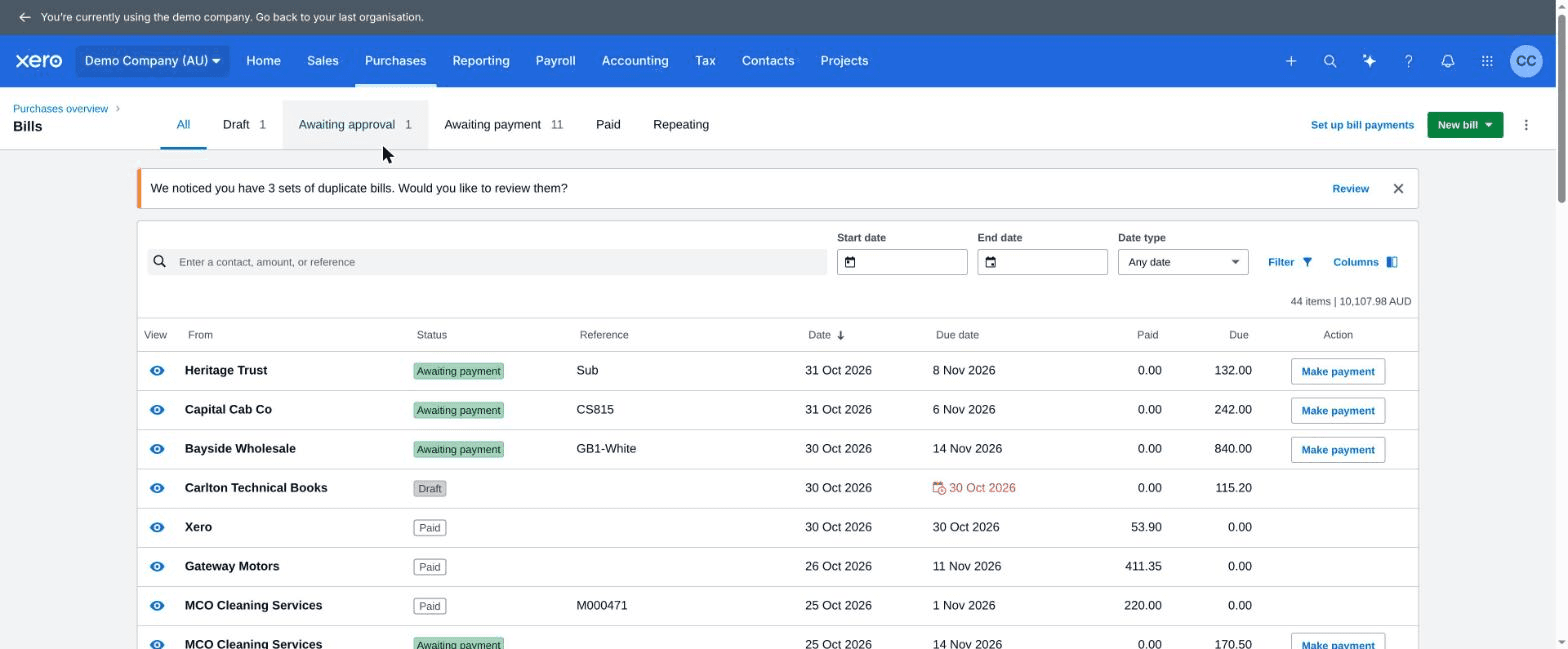
Review duplicate bills
Purchases > Bills > menu icon > Review duplicate bills
Per Xero’s help the check compares contact, reference and amount, and you can void, delete or keep each pair. A reference that differs only by a space, as MHY 3117 does, may not be flagged, so read the references yourself.
Source: Xero Central, Add and track your bills in Xero, checked 30 Oct 2026; the menu clicked through in Xero’s Demo Company (AU) on 31 Oct 2026
How do I find and allocate a supplier credit note in Xero?
Suppliers often raise a credit note without sending you a copy, so the statement is where you first see it.
If you have never seen the document, ask the supplier for it. Our guide on chasing a missing credit note has the email and the follow-up.
Once you have the credit in Xero, the rules for applying it come from Xero Central’s page on applying a supplier’s credit to a bill:
- A credit can be applied only to a bill that is Awaiting payment, not to a draft or a paid one.
- More than one credit can go on one bill, up to the amount still outstanding, and one credit can be spread across several bills.
- When you approve the next bill for that supplier, Xero prompts you to allocate any credit you hold.
Xero
Checked
Allocate a credit to an existing bill
Purchases > Bills > Awaiting Payment tab > open the credit > options button (top right) > Allocate Credit
We give no click path for creating the credit note in the first place, because we could not confirm the current menu wording.
Source: Xero Central, Apply a supplier’s credit to a bill, checked 30 Oct 2026
The Merrin credit note does not say which invoice it relates to. Work out which bill the returned fittings were on, and allocate it there. If that bill is MHY3102, approve the draft first. A credit can only go onto a bill that is Awaiting payment.
A credit note you have not entered can also change the GST for the period it belongs to. How it is treated depends on your accounting basis and your registration, so ask your registered tax agent. General information, not tax or legal advice.
How do I reconcile a supplier that bills in another currency?
Foreign-currency suppliers are the awkward case. Users on Xero’s Product Ideas forum have reported since 2023 that Supplier Bill Activity does not show amounts in the supplier’s currency. Statemint’s Xero guide says Aged Payables shows foreign-currency items in your base currency. To confirm it on your own organisation, open one foreign-currency bill and compare its amount with the report line.
Match on reference first. The amounts will differ by whatever rate Xero used when each bill was entered. For the lines that matter, open the bill and read the amount in the supplier’s currency. Small rate differences on payments are exchange differences, so do not chase them as if they were errors. For the matching order, see how lines get paired.
How often should you reconcile supplier statements?
Do it each month for the suppliers you pay every month, and again before a payment run if an account is in dispute. Someone you only buy from a couple of times a year can usually wait until the next order. The month-end and pre-payment-run checklist sets the cadence out in a table.
Twenty suppliers a month: where Statement Zen fits
Merrin took eight lines and five causes. With 20 suppliers like it you are looking at 40 exports, 20 lookups and a stack of emails.
Statement Zen is our product, and it can reconcile Xero supplier statements automatically. Connect Xero once with a read-only sign-in, forward the supplier’s statement as it arrived, and each line is matched against your open Xero bills and credit notes. Nothing in Xero is changed by the connection, so approving the draft bill and voiding the duplicate stay your decisions.
To try it on one statement, use the free reconciliation.
Questions people ask
Does Xero have a supplier statement reconciliation feature?
Which Xero report should I use to check a supplier statement?
Why does my supplier’s statement not match Aged Payables?
Can I print a supplier statement from Xero, like a customer statement?
How do I reconcile a supplier that bills in a foreign currency?
Can I automate supplier statement reconciliation in Xero?
About the author
Michael Usov, Founder, Statement Zen
Michael Usov founded Statement Zen, which reconciles supplier statements against your accounts payable ledger. He also runs MRU Consulting, which builds accounts payable and ERP integrations, including for construction businesses on Viewpoint Vista. For the last fifteen years he has worked with finance controllers and AP managers in construction companies, doing and automating supplier statement reconciliation and other accounting tasks.
Sources
- Xero Product Ideas: Reporting, add ageing for Customers and Suppliers (Xero community team reply, 2024), read
- Xero Central: Contact transactions reports, read
- Xero Central: Payable Invoice Detail report, read
- Xero Central: Account Transactions report, read
- Xero Central: Aged Payables Detail report, read
- Xero Central: Select contents and display order in a new report, read
- Xero Central: Apply a supplier’s credit to a bill, read
- Xero Central: Add and track your bills in Xero, read
- Xero Central: Send a customer statement, read
- Xero Product Ideas: Supplier Bill Activity report, run in foreign currency with totals, read
- Xero Product Ideas: Contacts, Supplier Statement Detailed Ledger (running balance request), read
- Xero blog: Product news, August 2022 (Payable Invoice Detail report), read
- Statemint: Xero supplier statement reconciliation, read
What changed
- : First published. Report names and menu labels checked against Xero help pages and Xero staff replies on this date.
- : Opening answer split into two short sentences, and each unverified route now has a confirm-on-your-organisation row in a table.
- : Ran Supplier Bill Activity, Contact Cash Activity, Payable Invoice Detail and Account Transactions in Xero’s Demo Company (AU) and replaced the hedged report notes with what each report showed. Added a screenshot of Supplier Bill Activity and shortened the report cards. Shortened the guide by about 1,200 words.
Read next
- Supplier Statement Reconciliation Checklist for Month-End and Before the Payment RunRead next to turn this into a month-end and pre-payment-run routine.
- How Supplier Statement Matching Works: References, Amounts, Dates and Part PaymentsRead this for how lines are paired, and when a person has to decide.
- How to Reconcile Supplier Statements in QuickBooks OnlineThe same job in another accounting system.